Why Features For teachers FAQ Bring it to your school
A classroom economy · iOS + Android

Students learn money by having some.

GoodCents turns a classroom into a working economy. Students get paid for showing up, pay rent and taxes, shop, save, borrow, and invest at live market prices — and every lesson arrives as something that happened to them.

No real money, ever No ads, no tracking, no student data sold Built by a teacher, for his own classroom
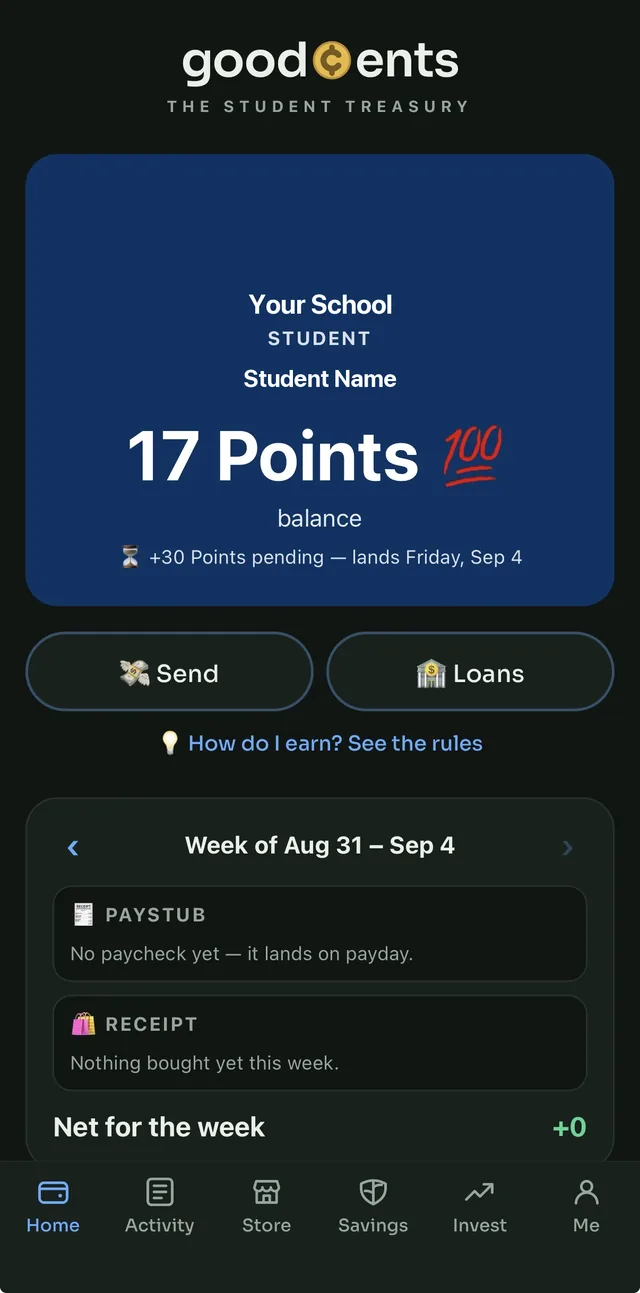
A student's home screen: balance, pending pay, and this week's paystub
Why a classroom economy

The lessons nobody remembers from a worksheet.

Financial literacy is usually taught as vocabulary. GoodCents teaches it as consequences — small, safe, weekly, and personal.

🧾
What does “net pay” mean?
It means the paystub said 35 and the wallet got 24. Gross, tax and rent, every Friday, on their own money.
🏪
Why save?
Because the mystery box costs 500 and chips cost 15, and the store is right there. Delayed gratification with a real prize at the end.
🌱
What is compound interest?
It's the number in the savings tab going up every payday on money that was itself interest last week.
💳
What's a credit score for?
Miss a loan payment and the score drops, the bank's rate rises, and the limit shrinks. Pay early and it costs less. Nobody has to explain it twice.
📈
Is investing just gambling?
Not when every trade needs a reason and every asset comes with a chart, the numbers traders use, and a daily note on both sides of the argument.
🏛️
Where does money come from?
A treasury with a hard cap. Give away too much and the whole class watches it drain. An economy with a budget teaches what an unlimited one can't.
What students get
01 / Payday

A paycheck for showing up.

Attendance becomes salary every payday, and the paystub shows every line on the way to the wallet.

  • Salary per class attended, imported straight from the district's attendance report
  • Progressive income tax with brackets the school sets, and seat rent — the recurring bill everybody pays
  • Teacher awards land in the same paycheck — and get taxed like income
  • Every week's paystub and store receipts kept, forever
Student home with the week's paystub
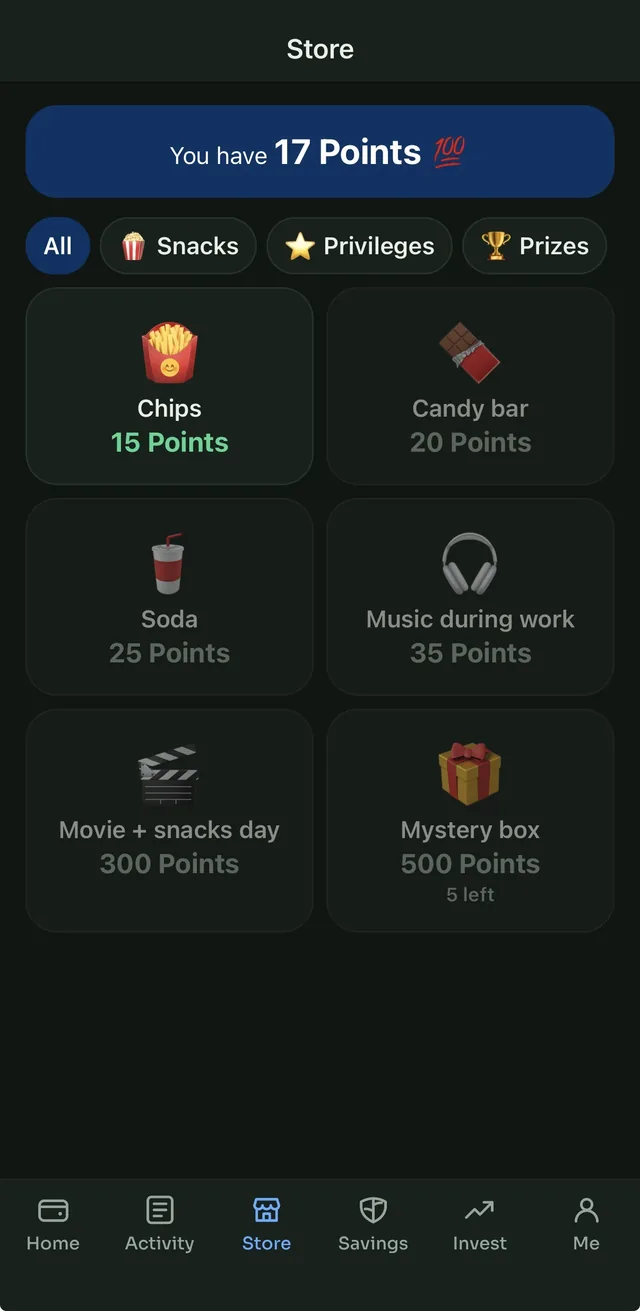
02 / The store

Something worth saving for.

Teachers stock it with whatever motivates the room. Students buy in the app and redeem with a QR code at the desk.

  • Snacks, privileges, passes, big-ticket prizes — categories and prices are the school's
  • Stock limits and per-student weekly limits
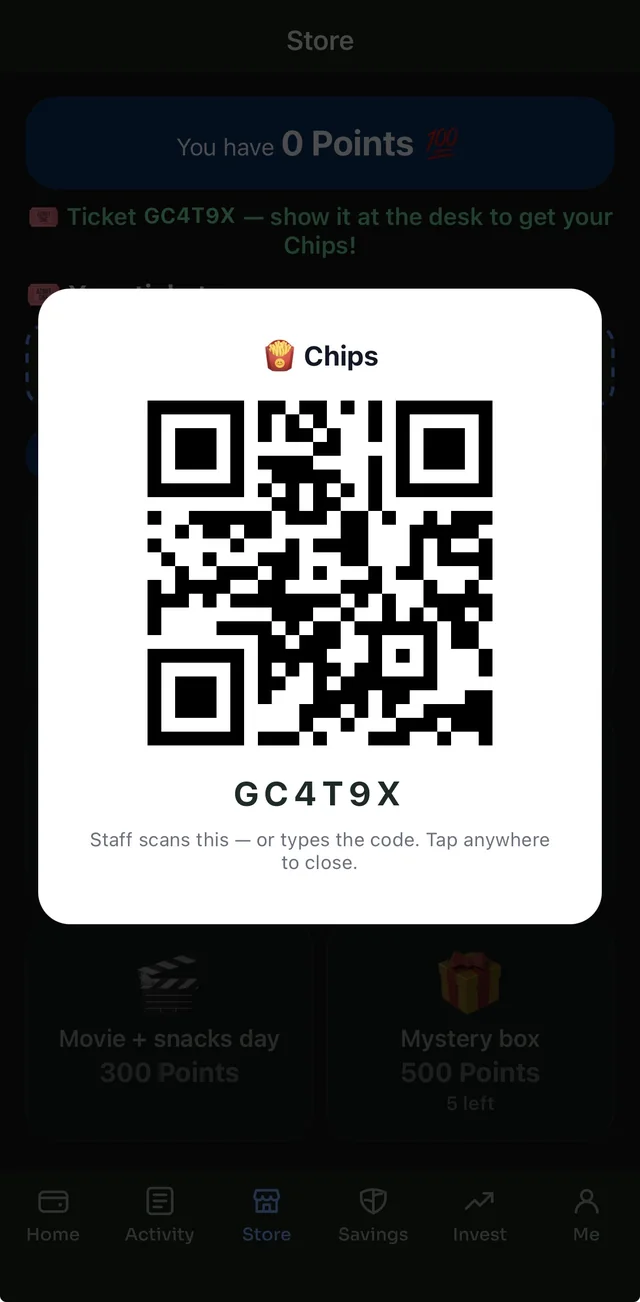
  • Money leaves the wallet at purchase; a ticket with a QR code comes back
  • Staff scan it at the desk — or type the six-character code if the camera won't cooperate
  • Two people can't redeem the same ticket; cancel an unredeemed one and the money returns
  • “Can't afford it yet” shown honestly, not hidden
The class store
A purchase ticket with its QR code and six-character code
03 / Savings

Interest that actually compounds.

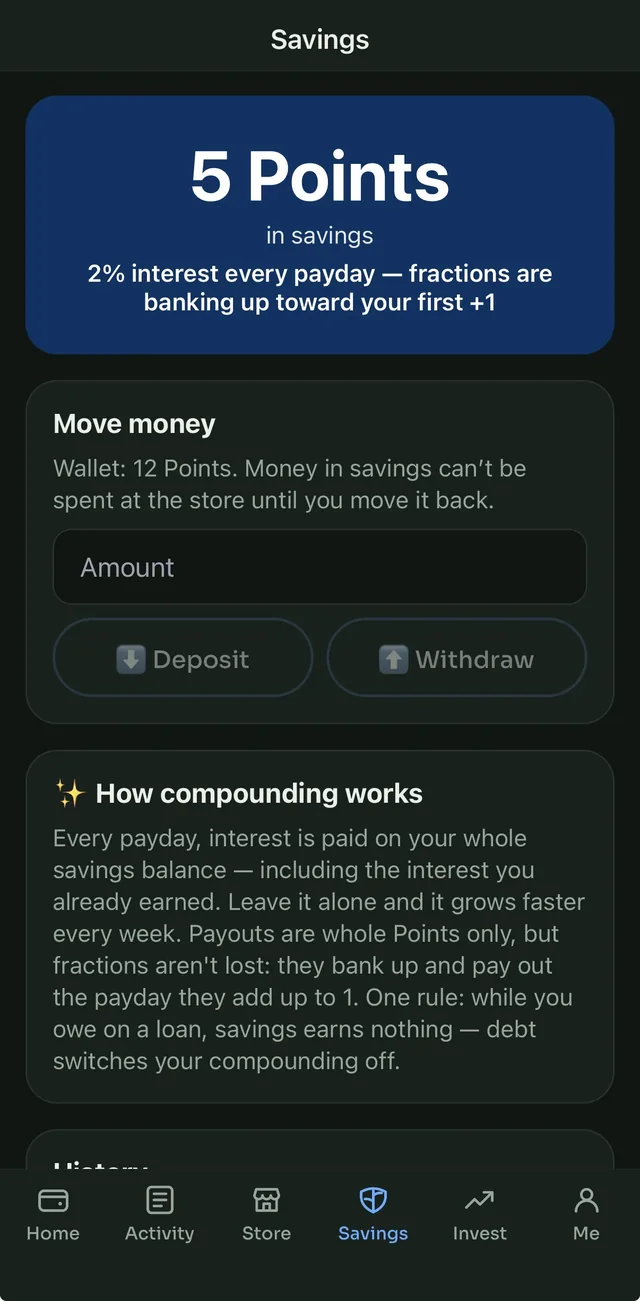
A separate savings balance earns interest every payday on the whole balance, interest included. Leave it alone and it grows faster each week.

  • Rate set by the school; paid every payday
  • Whole-unit payouts, with fractions banked toward the next one
  • Money in savings can't be spent at the store until it's moved back
  • Owe on a loan and savings earns nothing — debt switches compounding off
Savings with compound interest
04 / Credit

Credit that has to be earned.

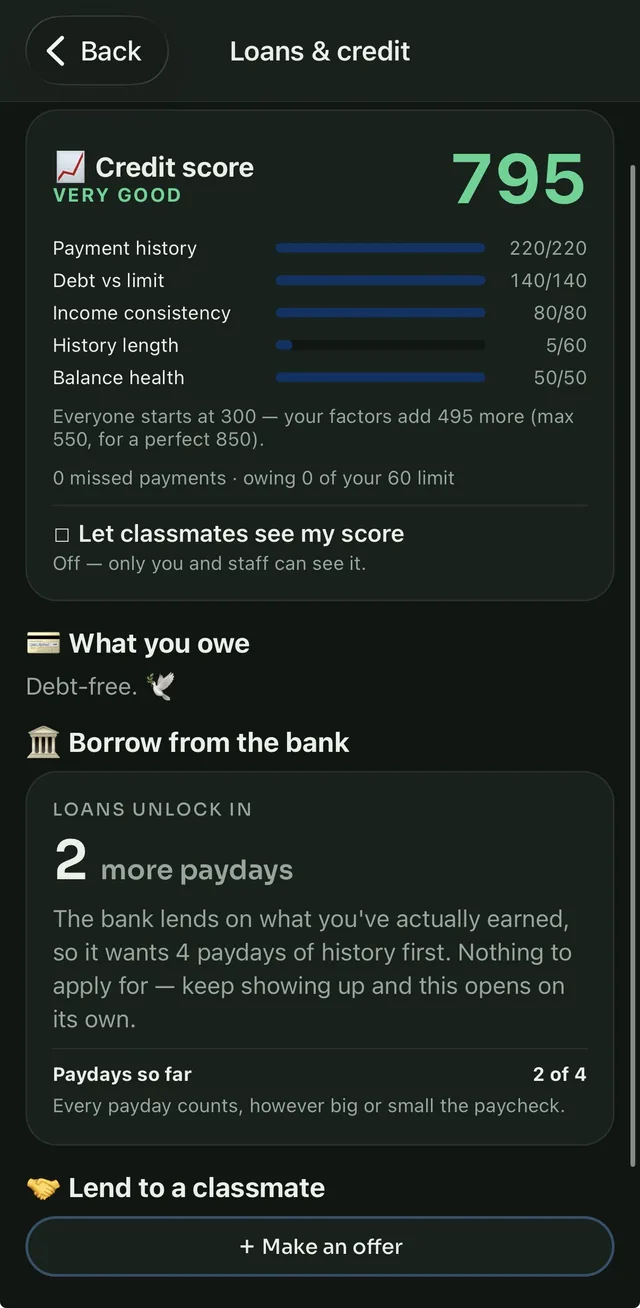
A credit score built from the ledger, a bank that lends on real income, and classmates who can lend on terms both sides accept.

  • A 300–850 score from payment history, debt, income consistency and balance health
  • The bank opens after four paydays of history; the limit grows with what you earn
  • Interest charged weekly on what's still owed — pay it off before the first payday and it costs nothing
  • Payments collected from paychecks, capped so a borrower always takes something home
  • Peer loans: lender proposes, borrower must accept, everyone sees the receipts
Loans and credit with a credit score
05 / Investing

Real prices. Real volatility. No bets.

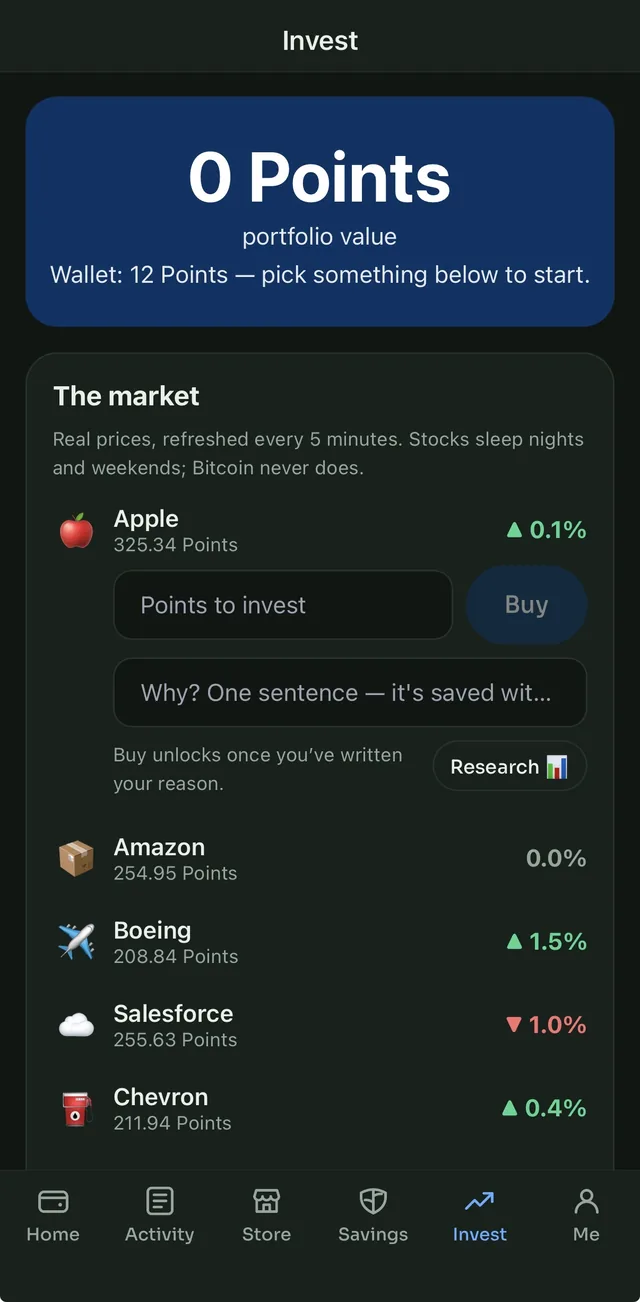
A curated set of names students have actually heard of — stocks, Bitcoin, gold — at live market prices. Simulated trades, and no way to wager on an outcome.

  • Prices refreshed every five minutes from real markets
  • Fractional shares, so 5 units of anything is a real position
  • Each school picks which instruments are on offer, and can lock investing
  • An invested cap per student; profits mint from the treasury, losses flow back
  • A buy needs one sentence on why. It's saved with the trade and shown back at the sell
Invest screen with a required reason before buying
06 / Research

The vocabulary traders use, explained.

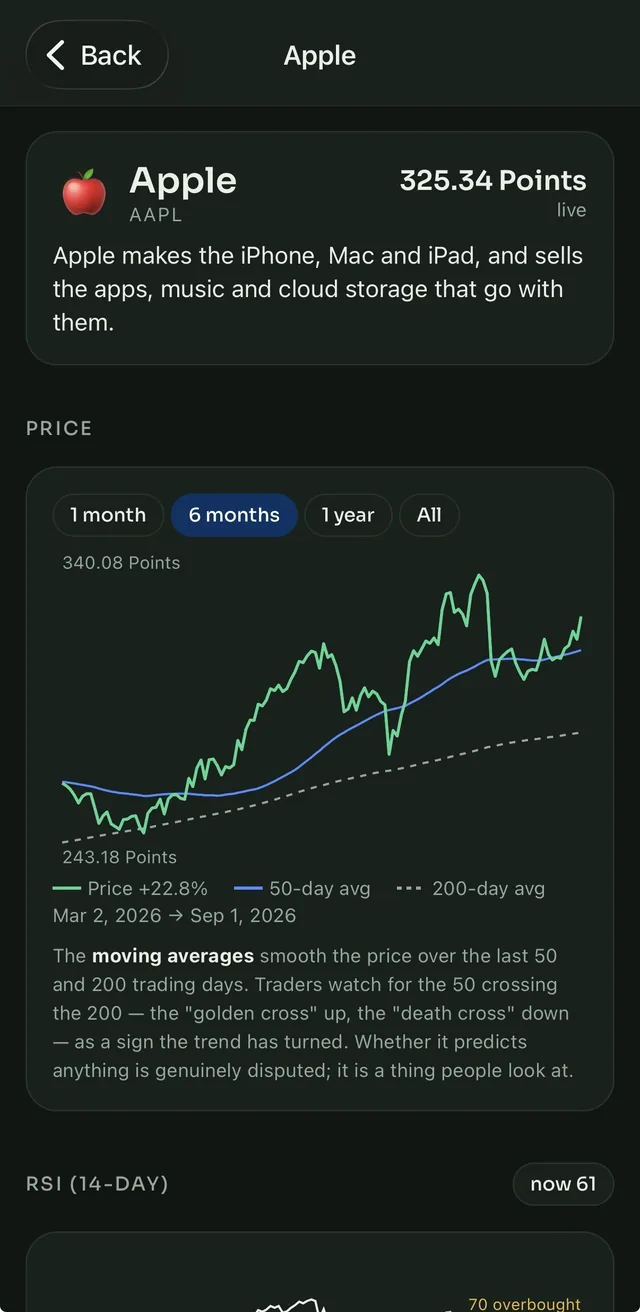
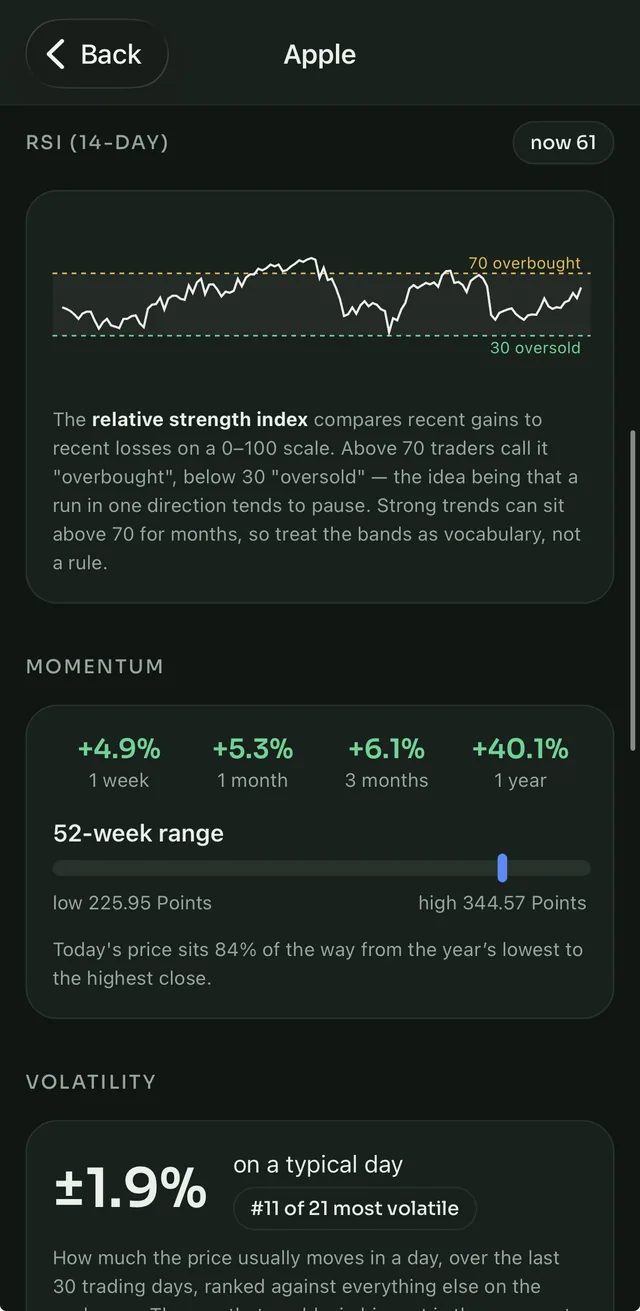
Every asset has a research card. Not tips — the actual tools, each one explained in plain language, with a note that whether it predicts anything is disputed.

  • Three years of price history with 50- and 200-day moving averages
  • RSI with the 70/30 bands, momentum over four windows, the 52-week range
  • Volatility as “a typical day's move”, ranked against everything else on the exchange
  • One plain sentence on what the company sells
Research card with a price chart and moving averages
07 / The morning note

The case for. The case against. What's going on in the world.

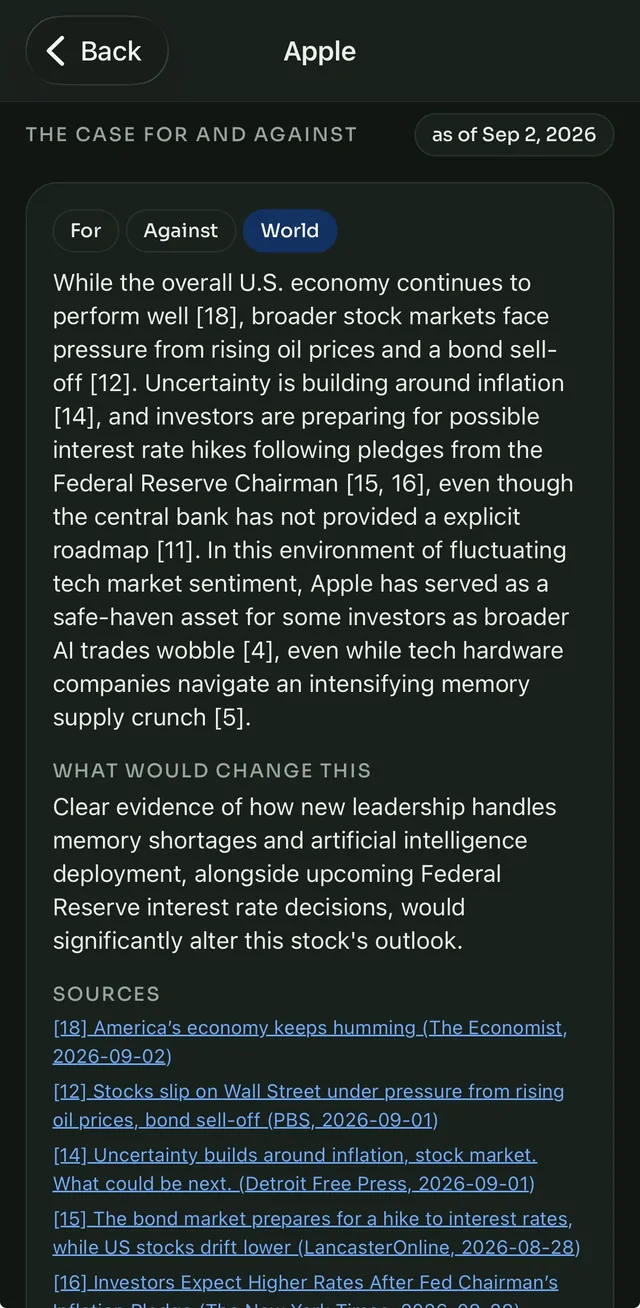
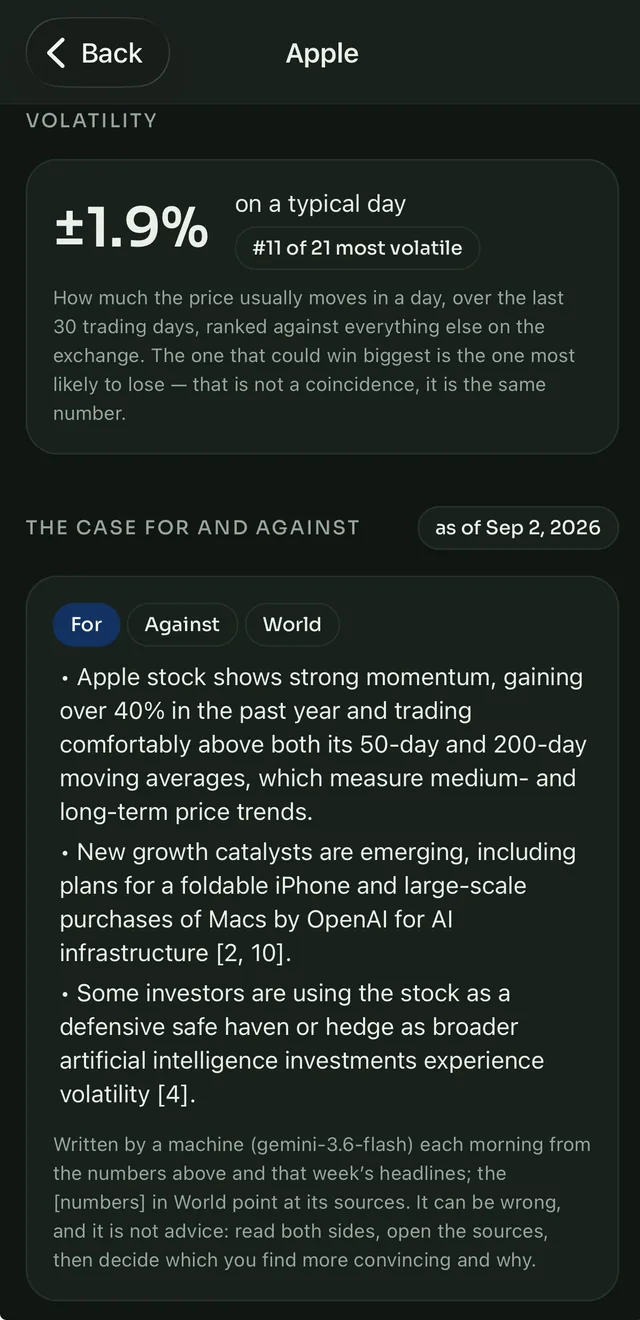
Each morning a short note lays out both sides for every asset, plus the week's news that bears on it — with every claim pointing at the headline it came from.

  • Written fresh each day, dated, and kept — so a decision can be checked against what the note said
  • Sources are the headlines it cited, numbered to match the text; nothing is invented
  • Never a recommendation: it says what a careful person would weigh, not what to do
  • Teachers read exactly what students read
The morning note's world section with cited headlines
For the person running it

Built by a teacher, so the tedious parts got the attention.

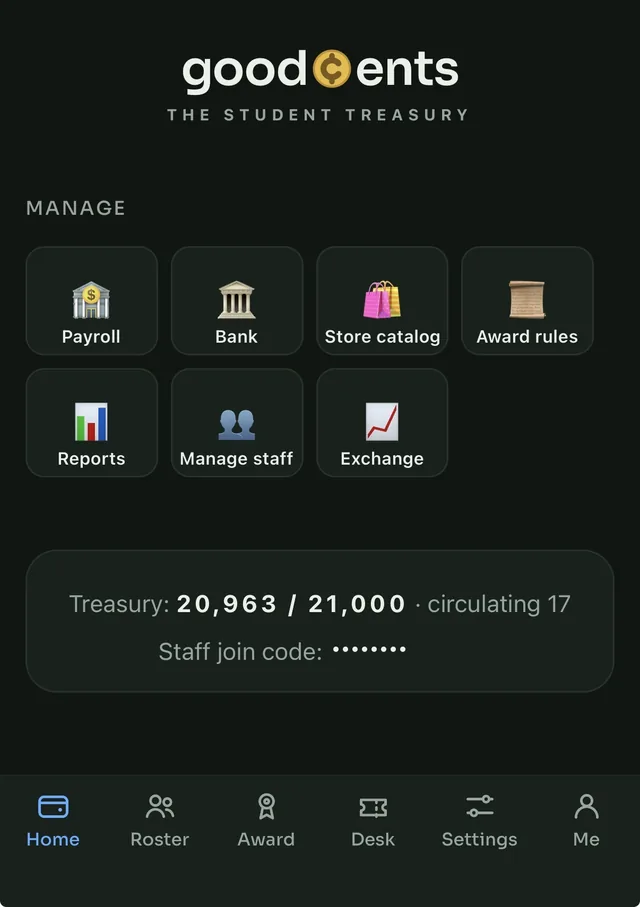
Paying thirty students is one tap. Most weeks, zero.

  • Payroll runs itself on payday once attendance is in — and refuses to run on a week it can't see
  • Attendance imports from the district's own weekly report; the roster imports the same way
  • Awards in seconds: pick students, tap a rule, done — with saved groups for whole classes
  • Fines, adjustments and voids all leave a trail; the ledger corrects but never rewrites
  • Every rule, rate, bracket, price and cap is the school's to set
Staff home screen

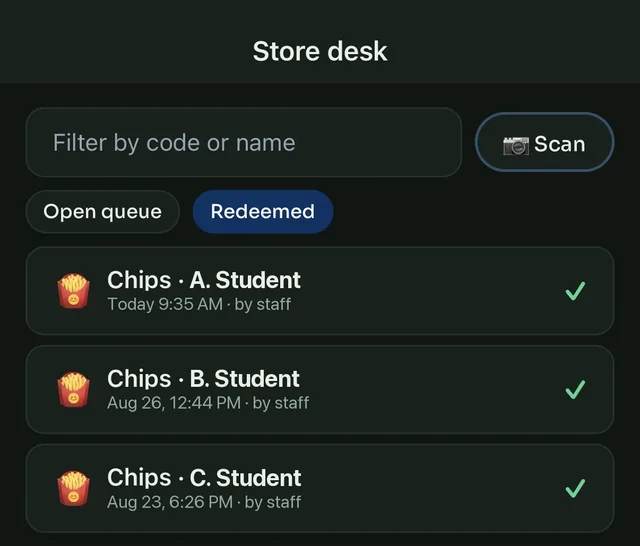
A desk that knows what's waiting and what's been handed over.

Scan a ticket or tap it in the queue. Two people can't redeem the same one.

  • Live queue of pending tickets, oldest first
  • Scan the QR or type the six-character code
  • A Redeemed view: what, who, when, and which staff member
  • Hand the desk to a trusted student as a classroom job
Store desk with redeemed tickets

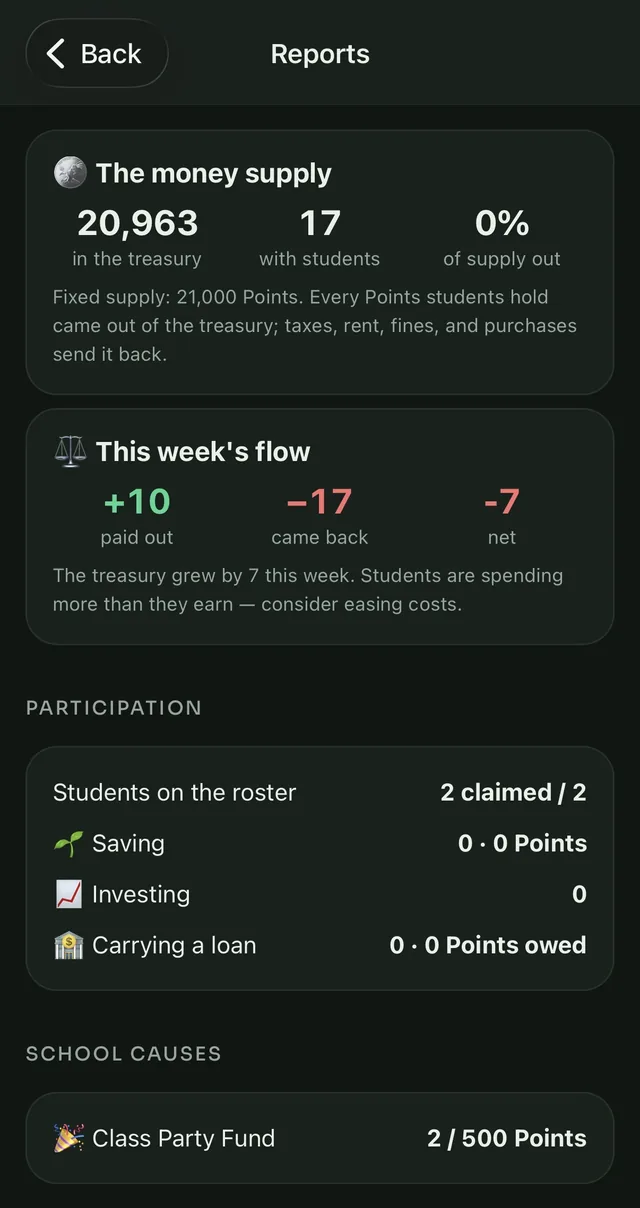
You can see the whole economy — and everything a student sees.

Reports show whether the money supply is healthy. Student pages show the reasoning behind every trade, which is what gets graded.

  • The money supply: treasury, circulating, minted vs. recycled this week
  • Who's saving, investing, or carrying a loan; top earners; what the store sells
  • Donation causes with progress toward a goal
  • Teachers open the same research cards and daily notes students do
  • Granular permissions: hand out the banker's job without handing out the keys
Reports: the money supply and participation
The full kit

Everything a classroom economy needs.

Earning
🗓️
Attendance salary
Paid per class attended, from the district's report
Award rules
Behaviour, work, volunteering — with daily caps
🧾
Paystubs
Gross, tax, rent, net — every week, kept
Costs
🏛️
Progressive tax
Brackets the school sets; withheld at payday
🪑
Seat rent
The recurring bill everyone pays
⚠️
Fines
Presets or custom amounts, always with a note
Spending & giving
🏪
The store
Snacks, privileges, passes, prizes; stock and limits
🎟️
QR tickets
Buy in the app, redeem at the desk, no double-fulfilment
💝
Gifts & donations
Send to a classmate, or donate to a school cause and lower your tax
Saving & borrowing
🌱
Compound savings
Interest every payday on the whole balance
🏦
Bank loans
Income-based limits, weekly interest, a free first week
🤝
Peer loans
Lender proposes, borrower accepts, payday collects
📊
Credit score
300–850, from the ledger, with the factors shown
Investing
📈
The exchange
Stocks, Bitcoin and gold at live prices, fractional shares
🔬
Research cards
Chart, moving averages, RSI, momentum, range, volatility
📰
The morning note
For, against, and the world — with cited sources
✍️
Reasons on record
One sentence per buy, shown back at the sell, listed for staff
Running it
Automatic payroll
Runs on payday once attendance is in; skips and notifies if not
🔐
Permissions & jobs
Per-role abilities; hand a student the store desk
🎨
Your school's branding
Name, colours, logo, and the currency's name
🔔
Notifications
Awards, payday, fines, loan offers — on the phone
🧹
Honest ledger
Insert-only; mistakes are corrected, never erased
🚪
Account exit
Students can close their account; the books stay balanced
Getting started

Set up in an afternoon. Pay on Friday.

The economy is configured, not coded. Decide what pays, what costs, and what's in the store, and the app does the rest every week.

1
Set the rules
Name the currency, set the salary, tax brackets, rent, and interest rates. Stock the store.
2
Bring in the class
Import the roster. Students sign in with their school Google account and are matched automatically.
3
Run payday
Import the week's attendance and payroll runs itself — salaries, tax, rent, interest, and loan collections in one pass.

Built by a teacher, for his own classroom.

GoodCents started at a continuation high school in California — a room full of students who'd heard the word “budget” a hundred times and never held one. Points on a whiteboard weren't teaching anything. A paycheck with a tax line on it did.

The rule from the start was that the economy has to be honest: a fixed money supply, an insert-only ledger, a bank that only lends on real income, and an investing simulation that makes students write down their reasoning. Nothing in it is a game mechanic that couldn't happen to them at twenty-five.

It's built to be one school's app first, and then any school's — colours, logo, currency and every rule are the school's own.

Questions

Frequently asked.

Is there any real money involved?
No. The currency is classroom currency with no cash value, the store is stocked by the school, and the exchange is a simulation on real prices. Nothing can be bought with real money and nothing can be cashed out. Students never enter a payment method.
How do students sign in?
With their school Google account. Staff import the roster first; a student whose school email matches is linked automatically, and anyone else enters a one-time claim code from their teacher. The school's email domain is enforced, so nobody outside it can join.
What student data does it hold?
Signing in with Google returns the basic profile — email address, name and profile picture — and nothing else; GoodCents can't read Gmail, Drive or Classroom. The roster row a teacher sets up holds first and last name, and optionally an expected email address, grade level, and a seat or class label. A student is never asked for any of it: grade level simply comes along if the roster is imported from the district's own attendance report. Everything after that is the economy's records — transactions, balances and paystubs, savings, loans and the credit score derived from them, store purchases, simulated trades, and the weekly attendance count that determines pay — plus a push token if notifications are on. No academic marks, no discipline records, no location, and no analytics or advertising SDKs of any kind. Students can close their account from inside the app. The privacy policy is the full inventory.
Where do the prices and the research come from?
Live quotes and daily price history come from market-data providers. Indicators are computed from that history. The morning note is written by a language model from the card's numbers and the week's public headlines, and every claim is stored with the headline it cited. No student data ever reaches any of these services.
Is the investing feature teaching students to gamble?
It's designed against that. There's no way to bet on an outcome, positions are capped, buys require a written reason, and the research is presented as vocabulary rather than advice — with the explicit note that whether any of it predicts prices is disputed. What a teacher can grade is the reasoning, not the return.
Can the teacher change the rules mid-year?
Yes — salary, tax brackets, rent, interest rates, store prices, loan caps, which instruments are available, and every award rule are settings, not code. Existing transactions never change; only what happens next does.
What does it cost?
GoodCents will be a per-school subscription billed to the school — never to students, and never through the app stores.

Give your students an economy.

GoodCents is in a closed pilot at one school, with a wider release to follow. If you run a classroom and want to be next, say hello.

iOS and Android · School Google sign-in · No real money, ever